
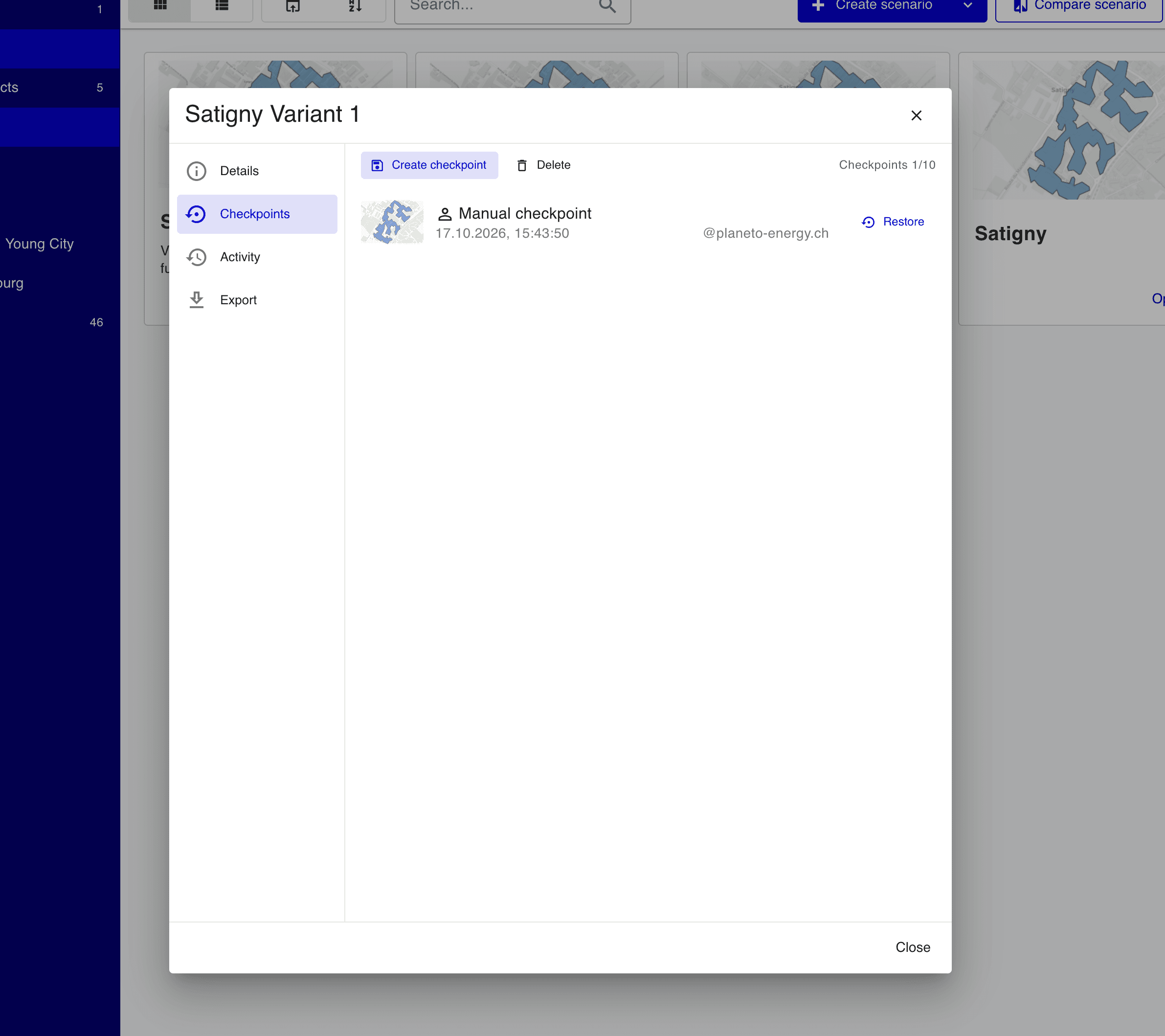
TESSA 6.3 gives you a safety net for your scenarios. Checkpoints let you try an idea, run a tool or rework a network, and go back to an earlier state if the result isn't what you wanted.
Scenario checkpoints
A checkpoint is a restorable snapshot of a whole scenario: its districts, buildings, networks, sources and results, exactly as they were when the checkpoint was taken.
How they work:
- Automatic checkpoints before tool runs: TESSA saves a checkpoint before a tool changes your scenario. If nothing has changed since the last checkpoint, no new one is created.
- Manual checkpoints: Open the scenario details dialog, go to Checkpoints and click Create checkpoint to save the current state at any moment, for example before you start a new variant of the design.
- Restore: Click Restore next to a checkpoint to return the scenario to that state. TESSA first saves a checkpoint of the current state, so a restore can always be undone.
- A rolling window: Each scenario keeps a limited number of checkpoints (shown as, for example, Checkpoints 1/10). When the window is full, the oldest checkpoint is removed to make room for the new one. You can also delete checkpoints you no longer need.
- Quotas: Checkpoints count toward your licence quotas.
Each checkpoint shows a map thumbnail, when it was taken and who created it.
Clearer details dialogs
The scenario details dialog now has About, Activity, Checkpoints and Export panels, and the project details dialog matches it. Scenario descriptions support Markdown, and projects show who created and last modified them.
Licence quotas and usage metering
- Licence size quotas: Organisations can cap the number of buildings and the geographic area (in hectares) per project. Limits apply when you create a project, edit its region, upload datasets, import from OpenStreetMap or run district-building tools. The region editor warns you as you approach the area limit.
- Usage metering: Tool calls, dataset buildings and model buildings can be metered against an included allowance instead of being capped, with monthly usage statements and quota-alert emails. The licence panel shows seat management and extra usage separately.
Other improvements
- Image tile layers: Add map layers from XYZ or TileJSON URLs and set their opacity.
- Location search in the region editor.
- Building floors, footprint area and height: Edit them in the building inspector. Datasets from OpenStreetMap, RegBL and uploads fill the floor count and footprint area, and a floor count with a footprint area fills a blank total surface.
- Building-substation pumps in finance: Pumps in building substations now count in investment, electricity and O&M costs, cost reports and network KPIs.
- Climate data distance check: Loading climate data is refused when the closest weather station is too far from the district.
- Custom tool card icons and colours in the Tools dialog.
Fixes
- Merging districts whose boundaries form several separate areas no longer fails.
- Booster heat pumps get default supply temperatures when none are set.
- Thermal sources without fuel, such as solar thermal, count as zero final energy.
- A borefield's regeneration source stays visible after you delete the borefield.